Custom SolutionsFast Shipping

How to Punch Down Keystone Jacks (Cat5e / Cat6)
 
 
Step 1: Strip the end of the cable. Step 1: Strip the end of the cable. Step 1: Make sure the stripper is adjusted properly on a scrap piece of cable. The Stripper should be adjusted to only score the jacket to make removing it easier and not nick the twisted pairs. Using a Coaxial Stripper strip around 1 inch of the jacket off.  Be careful not to nick the conductors as this will cause the wire to break or short out the connection causing problems down the road. Inspect all wires for damage before proceeding to step 2. We use Ideal's 45-163 Coaxial Stripper for this how to.


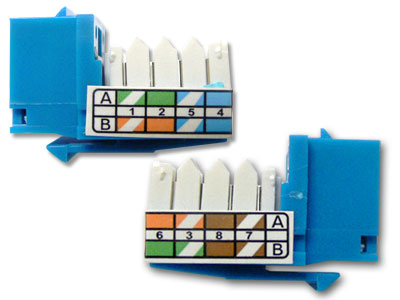
Step 2: Straighten the pairs. Step 2: Straighten the pairs out completely and lay them over the top of the keystone jack noting the color pattern for the 568b wiring. Note: Each keystone jack is slightly different in how they are labeled and how the colors are arranged. The 568B standard is most commonly used and ends of the cable must have the same standards to communicate. We have the 3 most common keystone jack styles pictured here. The first jack pictured has the 2 standard pairs on the right, and the 2 variable pairs on the left. The A standard is the center column and the B standard is on the left. Both A and B standard applies to the right side of the jack.  The solid color box with the lower right corner missing represents the solid color wire with the white stripe. The white box with the colored tip represents the white wire with the colored stripe.
The second jack pictured here has both A and B standards on both sides of the jack, with the color code running down the center. The solid color rectangle represents the solid color wire with the white stripe, wile the half white half color rectangle represents the white wire with the colored stripe.
The third jack pictured here has the A and B standard codes labeled on the outside of the jack. With the A standard on top and the B standard on the bottom. The solid box represents the solid wire with the white stripe Wile the box with the white diagonal stripe going throught the middle, represents the white wire with the colored stripe.
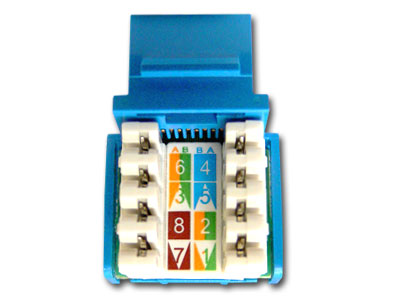
Keystone Jack Keystone Jack Keystone Jack Side View
 
Step 3: Wires pressed into grooves of keystone jacks. Step3: Keeping the pairs as twisted as possible press the wire into the correct groove with your thumbs. If you completely straighten the wires to run them through the jack you will risk cross talk between the pairs.
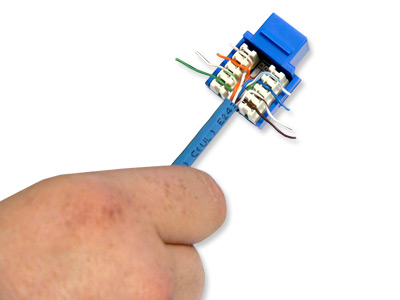
 
Step 4: Punchdown wires into keystone jack using punchdown tool. Punchdown tool Keystone Jack with wires punched down. Step 4: Step 4: Using a punch down tool punch the wires down into the blades built into the keystone jack. The blades in the jack are designed to work with solid cable, and may not work with stranded cable. Make sure the blade (as noted in the picture) is facing the outside of the keystone jack. If you reverse it you will cut the wires inside the keystone jack rendering them useless. The punch down tool should cut off the remaining pieces of the wire on the outside, but sometimes you may need to punch them down a 2nd time and wiggle the wire to it breaks clean off. Once this is done you can install the dust covers if your keystone jack comes with them. This keystone jack did not have the covers. The covers should never be used to do the job of the punch down tool.

-For this Demo we used an ideal punch down tool, However we do have an economy model listed here. If you plan on doing a lot of keystone jack (as I have done throughout the years) I would recommend going with the ideal model listed here It will save you a lot of time re-punching down the wires to get them to cut off.
 
1-45EW
Cat5e Keystone Jack - 90 Degree 110 for UTP - White Cat5e Keystone Jack - 90 Degree 110 for UTP - White

ComputerCableStore™ CAT5e Keystone Jack - 90 Degree 110 for UTP - White are available in a variety of five different colors intended to assist in the task of identification. The design of our CAT5e Keystone Jacks provide excellent performance that meets or exceeds the industry standard TIA/EIA 568-B. The ComputerCableStore™ Category 5e keystone jacks are designed to work with a wide variety of the ComputerCableStore™ Blank Snap-In Patch Panels and Snap-In Wall Plates.
Cat 5 e cable is an enhanced version of Cat 5 that adds specifications for far end crosstalk. It was formally defined in 2001 as the TIA/EIA-568-B standard, which no longer recognizes the original Cat 5 specification. Although 1000BASE-T was designed for use with Cat 5 cable, the tighter specifications associated with Cat 5e cable and connectors make it an excellent choice for use with 1000BASE-T.
A Keystone module is an industry standard type of wall jack used in residential and business environments. The system consists of a modular face plate to which jacks are mounted. They are generally used as a termination point for permanent cable installations.


More Info
7-4PW
Keystone Wall Plate - Single Gang - 4 Port - White Keystone Wall Plate - Single Gang - 4 Port - White

ComputerCableStore™ Keystone Wall Plate - Single Gang - 4 Port - White come in either Ivory or White and consist of anywhere from one to six ports. We also carry blank Wall Plates for covering up those unused and unsightly cable entry points. These Wall Plates are great to use with our variety of Audio / Video, CAT5e and Cat6 Network Keystone Jacks, as well as our RJ11/12 Telephone Keystone Jacks.
Cat 5 e cable is an enhanced version of Cat 5 that adds specifications for far end crosstalk. It was formally defined in 2001 as the TIA/EIA-568-B standard, which no longer recognizes the original Cat 5 specification. Although 1000BASE-T was designed for use with Cat 5 cable, the tighter specifications associated with Cat 5e cable and connectors make it an excellent choice for use with 1000BASE-T.


More Info


CableCash® Details